Ask and reports
Ask one clear question and generate a sectioned reading that is saved in history.
Questions this guide answers
- Can I ask about career?
- How do I write a good astrology question?
- Where are my reports saved?
Before you begin
- Create or select a birth profile with date, time, and place of birth.
Step by step
- 1
Confirm the profile and mode
Select the person the question is about, then choose a focused Ask question or the structured report builder.
Expected result: The intended person is active and either the focused Ask flow or structured report builder is selected.
- 2
Write one concrete question
Name the life area, decision, and useful time horizon. Avoid asking for every life topic in one prompt.
Expected result: The question contains one life area, one decision, and a useful time horizon.
- 3
Review intent and cost
Check the interpreted topic, any professional-advice acknowledgement, and the displayed credit cost before generation.
Expected result: The interpreted topic, required acknowledgement, and displayed credit cost are visible before generation is confirmed.
- 4
Read evidence before guidance
Use the chart factors, timing, limitations, and follow-up prompts to understand why the report reached its conclusion.
Expected result: The report’s chart factors, timing, limitations, and follow-up prompts have been reviewed before its guidance is used.
- 5
Save or share deliberately
Keep the report in history, translate it, export a PDF, or share only after checking that it contains the intended profile context.
Expected result: The report is visible in history or in the chosen translation, export, or sharing flow with the intended profile confirmed.
Watch the walkthrough
Draft one clear concern, confirm the guidance boundary, and keep History within reach. The focused question and acknowledgement are ready, and past reports remain accessible.
Read transcript
Open Ask with the intended profile active and frame one focused question about a decision, theme, or time window.
Review and confirm the guidance acknowledgement. Astrology-based guidance is not medical, legal, financial, mental-health, or emergency advice.
Open Past reports to revisit completed or draft readings before deciding whether to continue with a new request.
Visual guide
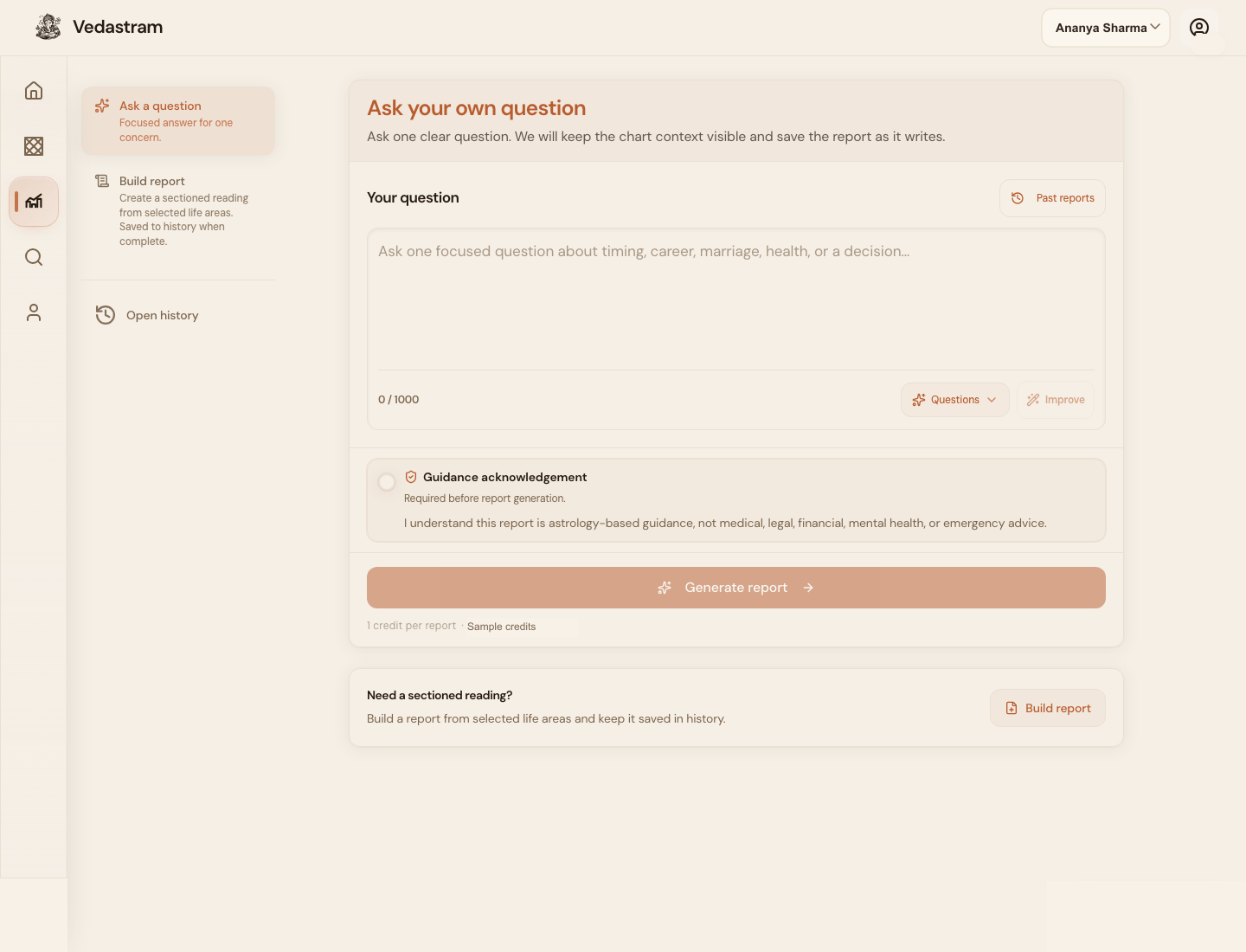
When to use this
Use Ask when you have one decision or life area you want explained from the chart.
A focused question gives better output than a broad request like tell me everything.
How credits work here
Generating a report can use credits when billing is enabled. The screen shows the credit cost before generation.
Reports are astrology-based guidance, not medical, legal, financial, mental-health, or emergency advice.
Troubleshooting and recovery
Generation stops or fails
Use Retry once. If credits were shown as spent without a completed report, check history before starting a duplicate generation.
The answer feels too broad
Ask a narrower follow-up that names one decision, one life area, and one time window.
Frequently asked questions
When should I use a report instead of chat?
Use a report for a structured, saved artifact. Use chat for exploration and short follow-up questions.
Is generated guidance professional advice?
No. It is Jyotish-based guidance and does not replace medical, legal, financial, mental-health, or emergency support.
Terms used in this guide
- Report
- A structured generated reading with sections that can be saved in history.
- Credit
- A usage unit spent on report generation or paid actions.
Did this guide help you complete the task?
Owner: Vedastram Product Education