Plans, billing, credits
Understand Free, Starter, Premium, Pro, credits, add-ons, upgrades, downgrades, and checkout availability.
Questions this guide answers
- Which plan do I need?
- Why is checkout unavailable?
- What uses credits?
- Can I downgrade?
Before you begin
- Sign in to manage active billing and saved payment status.
Step by step
- 1
Compare the actual allowance
Review profiles, included credits, report access, practitioner features, billing interval, and what is not included.
Expected result: Plan differences in profiles, credits, report access, practitioner features, billing interval, and exclusions are visible.
- 2
Choose plan or add-on
Use a subscription for recurring access or an add-on for one-time credits without changing the monthly plan.
Expected result: The selected product is identified as either a recurring subscription or a one-time add-on.
- 3
Review the checkout summary
Confirm product, price, tax or currency display, acknowledgement, and return path before opening Razorpay.
Expected result: The checkout summary shows the product, price, tax or currency display, acknowledgement, and return path before payment opens.
- 4
Verify the result
After payment, wait for entitlement refresh and confirm the plan or credits in Settings before retrying a paid action.
Expected result: Settings shows the refreshed plan or credit entitlement, or a visible state indicating that verification is still pending or failed.
- 5
Manage future changes
Review whether an upgrade is immediate and whether a downgrade or cancellation takes effect at the end of the paid cycle.
Expected result: The effective timing of an upgrade, downgrade, or cancellation is visible before the change is confirmed.
Visual guide
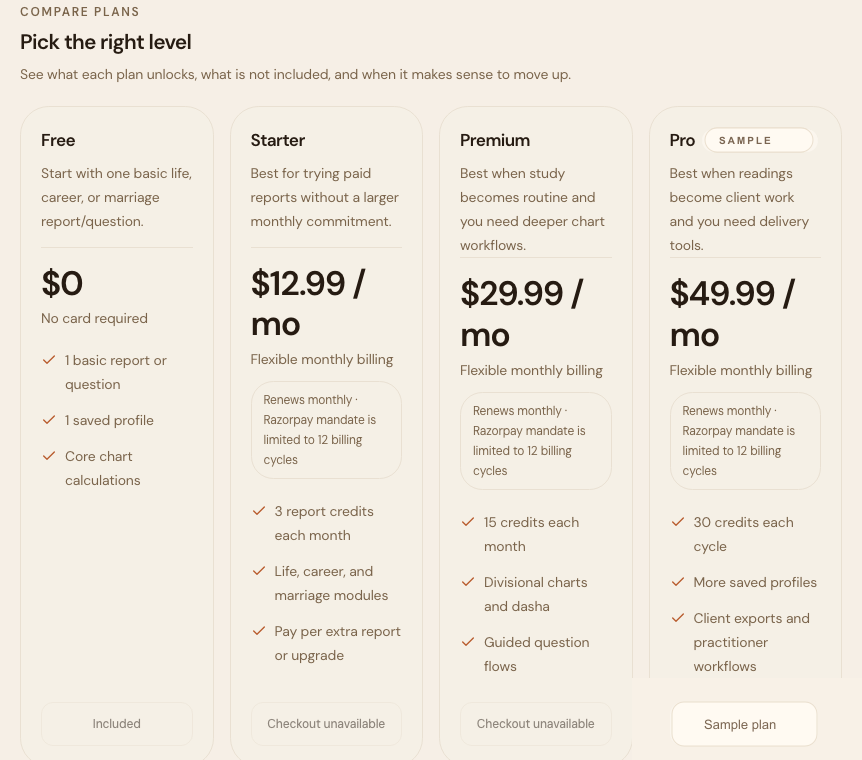
Plan chooser
Free is for trying one basic report. Starter is for a few reports each month. Premium is for deeper study. Pro is for repeated client-style workflow.
If checkout is unavailable, the app should disable purchase buttons and explain billing is not live in the current environment.
Changing plans
Upgrades can be immediate. Downgrades and cancellations usually take effect at the end of the paid cycle.
Always review the change before confirming so you know whether access changes now or later.
Troubleshooting and recovery
Checkout is unavailable
Purchasing is disabled in the current environment or region. Do not retry a disabled button; use the displayed availability guidance or contact support.
Payment succeeded but credits are not visible
Return to Settings, refresh once, and check the payment-success state. Avoid paying again until the entitlement status is confirmed.
Frequently asked questions
What uses credits?
Generated reports, AI interpretations, Marriage Matching, Prashna, and other paid generation actions can use credits. Some flows preview the cost; Marriage Matching and Prashna currently submit immediately, so check the current balance before starting them.
Does buying an add-on change my plan?
No. An add-on is a one-time credit purchase unless the checkout summary explicitly says otherwise.
Terms used in this guide
- Credit
- A usage unit for reports and paid generation actions.
- Add-on
- A one-time purchase that does not change the monthly subscription plan.
Did this guide help you complete the task?
Owner: Vedastram Product Education