Birth Chart
Understand the core chart, including Lagna, Moon sign, Birth Nakshatra, houses, planets, and dignity.
Questions this guide answers
- What is my birth star?
- What does my Moon nakshatra mean?
- Where are my planets?
Before you begin
- Create or select a birth profile with date, time, and place of birth.
Step by step
- 1
Confirm the active profile
Check the profile name and birth details before interpreting the chart or exporting it.
Expected result: The intended profile name and birth details are visible before interpretation begins.
- 2
Choose the chart style
Use the available chart-style control to switch between the supported North Indian and South Indian presentations without changing the calculation.
Expected result: The selected chart presentation is visible while the calculated placements remain unchanged.
- 3
Read from foundation to detail
Start with Lagna, Moon sign, Birth Nakshatra, and the planet table. Then inspect houses, signs, dignity, degrees, nakshatra, and pada.
Expected result: The core anchors and detailed planet and house data have been reviewed for the same profile.
- 4
Export only after checking context
Use the chart action menu for PDF, download, native share, or WhatsApp after confirming the profile and requested sections.
Expected result: The chosen export or sharing action opens for the confirmed profile and requested chart sections.
Watch the walkthrough
Open the intended Rashi chart and compare its South and North Indian layouts. The Lagna, Birth Nakshatra, chart positions, and planet legend remain visible across layouts.
Read transcript
Confirm the active profile and open Birth Chart. The Rashi chart loads with Lagna and Birth Nakshatra metadata for orientation.
Switch between South Indian and North Indian layouts without changing the underlying planetary positions.
Review the house labels, planet abbreviations, and planet-color legend before moving to deeper chart tools.
Visual guide
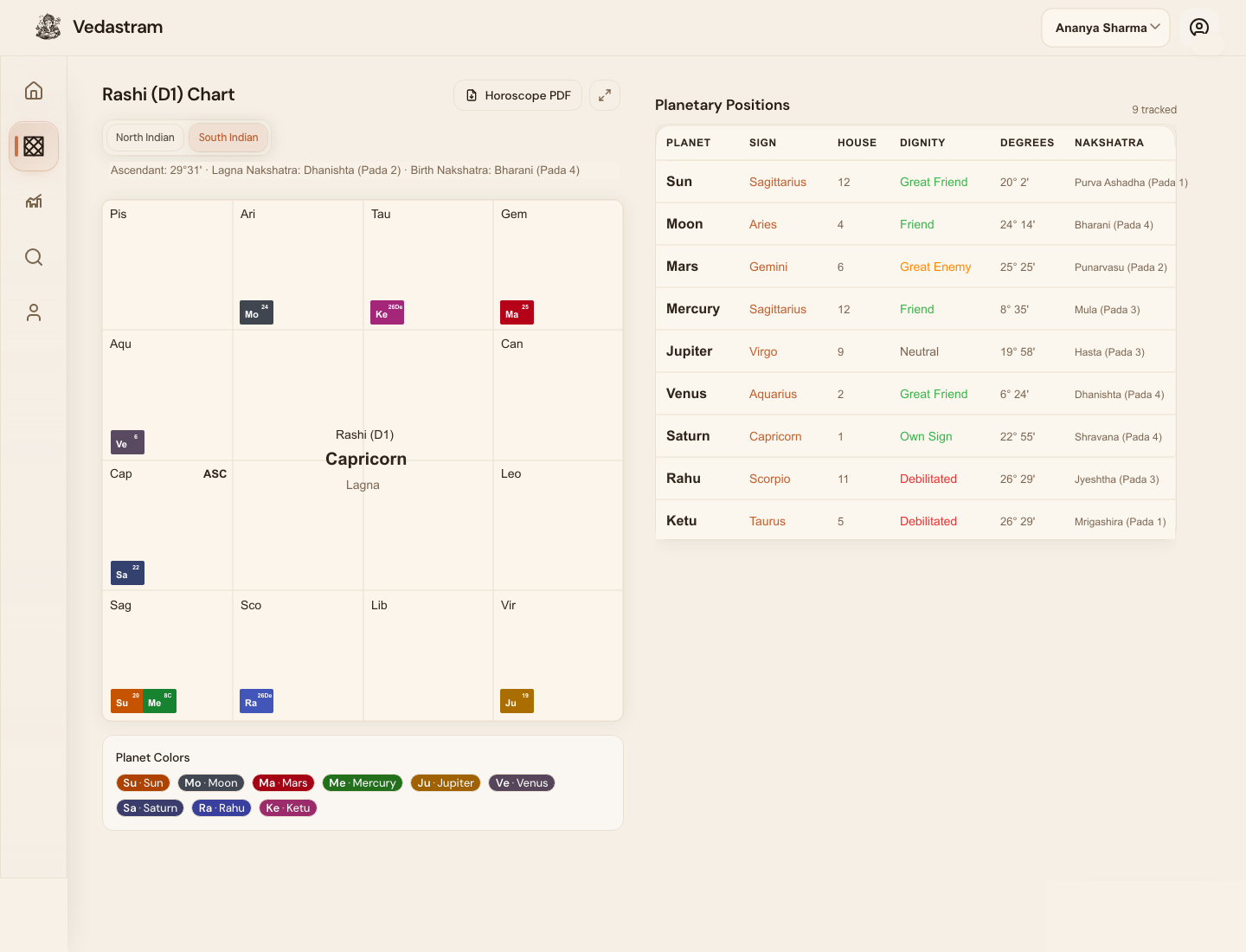
What it shows
The birth chart is the main map. It shows Lagna, planets, signs, houses, dignity, and each planet nakshatra.
Birth Nakshatra means the Moon nakshatra. Lagna Nakshatra means the ascendant nakshatra. They are related but not the same.
How to read it first
Begin with Lagna sign, Moon sign, Birth Nakshatra, current dasha, and the planet table. Do not try to interpret every house at once.
Use the PDF action when you need a shareable chart summary.
Troubleshooting and recovery
The chart is empty or still loading
Confirm that the profile has a valid date, time, and place. Retry after the calculation finishes, or edit incomplete birth details.
The chart style changed but the placements did not
That is expected. Chart style changes the visual arrangement, not the sidereal longitudes or houses.
Frequently asked questions
Is Birth Nakshatra the same as Lagna Nakshatra?
No. Birth or Janma Nakshatra is based on the Moon. Lagna Nakshatra is based on the ascendant degree.
Can one placement determine a prediction?
No. Significant conclusions should combine houses, lords, dignity, aspects, relevant divisional charts, and timing.
Terms used in this guide
- Birth Nakshatra
- The nakshatra occupied by the Moon at birth. This is also called Janma Nakshatra.
- Lagna Nakshatra
- The nakshatra occupied by the ascendant degree.
- Pada
- One of four quarters inside a nakshatra.
Did this guide help you complete the task?
Owner: Vedastram Product Education